Features
We’ve reinvented the database for the information era.
TypeDB is a polymorphic database with a modern programming paradigm. Its data model unifies the strengths of relational, document and graph databases without their shortcomings. TypeQL, its groundbreaking query language, is declarative, functional, and strongly-typed, simplifying data handling and logic.
Data model
Schema-first
TypeDB is a schema-first database - you define a schema first using a rich and expressive language, TypeQL. Then you insert data that conforms to the provided schema. All writes and reads are validated against the schema.
Entities, relations, attributes
TypeQL implements the polymorphic entity-relation-attribute (PERA) model for its schemas and data. Entities, relations, and attributes are all first-class citizens and subtypable, allowing for expressive modeling without normalization or reification.
Hypergraph structure
TypeDB data structure can be seen as a hypergraph. Relations can connect any number of entities or attributes (n-ary, not binary). Relations can be defined to play a role multiple times. And entities and relations can own multiple attributes of the same type. This structure maintains true context without artificial joins or intermediary nodes.
Declarative schema
The schema provides a structural blueprint for data organization, ensuring referential integrity in production. Extend your data model seamlessly in TypeDB, maintaining integrity during model updates and avoiding any query rewrites or code refactors.
Strictly typed
Every entry in a TypeDB database must adhere to the schema. This strict typing prevents inconsistent or malformed data from being inserted, ensuring the database always matches the structure defined by your model. It eliminates schema drift, leading to predictable data and more reliable application behavior.
No nulls
Unlike SQL and NoSQL modeling languages, TypeQL is entirely conceptual and does not need to implement nulls to store the absence of a value. Keep nulls out of your query results without compromising for a schema-less database.
@card (cardinality)
By default, entities & relations can own one value of an attribute, and roleplayers in relations can be played once per relation. Apply constraints in the schema to enable other cardinalities wherever needed, with the expressivity to select a single value or a specific range.
define entity person, owns email @card(1..5);@abstract
Just like abstract types in OOP, you can define abstract types in TypeDB. They can't have instances, but act like an abstract base class that encapsulates common functionality of subtypes.
define entity animal @abstract, owns number-of-legs;@key
Key constraints are like primary keys in SQL - they act like IDs, ensure you can only insert one object of a specific type with that key value.
define entity order, owns order-id @key;@unique
@unique is similar to @key, but optionally supports the ability to have multiple values of the same attribute type - whereas @key always mandates each object to have precisely one key value.
define entity user, owns phone @unique;@doc
Document your schema in the schema itself. Attach docstrings to any type, to its capabilities (owns, plays, relates, sub), or to functions, keeping documentation versioned alongside the model it describes.
define entity person @doc("An individual customer");@meta
Attach arbitrary key-value metadata to types, capabilities, and functions (UI hints, icons, ownership labels) and read it in queries with the get_meta() function.
define entity person @meta("icon", "silhouette.png");Polymorphism
TypeDB natively enables and encourages polymorphism in your schema. Entities, relations, and attributes can all have subtypes that inherit the behavior of their supertypes.
Subtyping
Inheritance in TypeDB allows you to create new types based on existing ones, providing hierarchy and abstraction. Simplify your schema by inheriting attributes and relationships from parent types. TypeDB models single inheritance, not multiple inheritance - each type can have exactly one parent type.
- 1
- 2
- 3
- 4
- 5
- 6
- 7
- 8
- 9
- 10
- 11
- 12
- 13
define
  user sub entity,
    owns full-name,
    owns email;
  intern sub user;
  employee sub user,
    owns employee-id,
    owns title;
  part-time-employee sub employee,
    owns weekly-hours;
Behavior inheritance
Subtypes inherit the behaviors of their supertypes. Write TypeQL queries that return results with a common supertype, without enumerating the subtypes (e.g. via UNION ALL in SQL).
- 1
- 2
- 3
- 4
- 5
- 6
- 7
- 8
- 9
- 10
- 11
- 12
- 13
- 14
- 15
define
  user sub entity,
    owns full-name,
    owns email @unique;
  employee sub user,
    owns employee-id @key;

insert
  $john isa employee,
    has full-name "John Doe",
    has email "john@typedb.com",
    has employee-id 183;
Polymorphic retrieval
When you retrieve objects of a specific type, objects of its subtypes are retrieved as well.
Abstract types
Define abstract types using @abstract. Abstract entities, relations and attributes cannot have instances, similar to abstract base classes in OOP. Abstract attribute types can additionally have no declared value type, and you can extend them to define subtypes with different value types.
define entity animal @abstract, owns number-of-legs;Hypergraph relations
Relationships are first-class citizens in the TypeDB data model. They can connect as many other objects as needed, and they can even connect to each other, forming a hypergraph structure. This ensures complex relationships and their metadata are modeled directly, without needing artificial intermediary objects.
Native relations and roles (interfaces)
In TypeDB, relations are not just pointers but are first-class concepts that can have their own properties (attributes) and participate in other relations. Roles define which entities participate in a relation.
define relation employment, relates employee, relates employer;N-ary relations
Construct rich data representations by directly implementing unary, binary, ternary, and n-ary relations in your conceptual model. TypeQL’s expressivity allows you to use the same constructor format for all relations, regardless of the number of roleplayers. You can also implement relations where multiple roleplayers play the same role.
insert $perm isa permission (subject: $johndoe, object: $file, action: $edit);Relations connected to relations
Relations are first-class citizens in TypeQL and so can own attributes and play roles in other relations just like entities. With no limit to the depth of nesting for relations, you can express the full richness of your data without reifying your data model.
match $perm isa permission (subject: $bob, object: $file, action: $edit);
insert $rqst isa change-request (target: $perm, requester: $alice), has requested-change "revoke";No JOINs
First-class relationships eliminate the need for JOINs from SQL.
match $user isa user; $perm isa permission (subject: $user);Attributes and values
TypeDB supports all kinds of attributes and values. Attribute types are global-scoped. This promotes reusability of definitions and simplifies schema maintenance, as you only update the attribute in a single place. They are queried using the same general patterns as entities and relations.
Numeric types
Supported numeric types include: integer (64-bit signed integer); double (64-bit double precision floating point); and decimal (decimal precision, stored as a 64-bit signed integer part, and an unsigned 19-digit fractional part).
Date and time types
Types for dates and times include: date (ISO 8601 compliant, like 2024-03-30); datetime (e.g 2024-03-30T12:00:00); datetime-tz (e.g 2024-03-30T12:00:00Z); and the duration type (again ISO 8601 compliant, like P1M).
String types
For strings, there is just a single type, string. It holds unlimited length text content. You might wish to allow only certain values, making it behave like an enum field (using @values) or use regex constraints e.g. for email validation (using @regex).
Boolean type
Finally, an attribute type can be defined as boolean - a simple true or false Boolean value.
Global-scoped attributes
Attributes in TypeDB are global-scoped. This means an attribute type, such as name or email, is defined once and can be owned by multiple different types.
define
person owns name;
company owns name;Multi-valued attributes
TypeQL is a conceptual data modeling language, and all attributes have many-to-many cardinality by default. Giving an entity or relation multiple attributes of the same type is as simple as declaring them in an insert, and read queries automatically return all values.
insert $john isa person, has email "john@gmail.com", has email "john@aol.com";Independent attributes
By default, attributes depend on their owners - they can only be inserted via a has clause, and are automatically deleted when their owners are deleted. In contrast, the @independent annotation allows instances of an attribute type to exist independently of their owner.
define
  attribute language @independent, value string;

insert
$english isa language "English";Purely abstract attributes
Define abstract attribute types with no declared value type, and extend them to define subtypes with different value types. Easily retrieve attribute values of different types by querying the abstract supertype.
define attribute id @abstract;Regex restriction
Specify that values are only valid if they conform to a specific regex - for example, for email, or sanitising special characters from user input.
define attribute email value string @regex("^.*@\w+\.\w+$");Range restriction
Declare that a value must fall within a certain range in order to be considered valid. For example, geographic latitude must be between -90 and +90. Partially open ranges are also supported.
define
  attribute latitude value double @range(-90.0..90.0);
attribute creation-timestamp value double @range(1970-01-01T00:00:00..);Enum restriction
Declare that only specific values are valid for an attribute, enum-style. For example, a coffee machine's status can be either "idle", "brewing", or "I'm a teapot".
define attribute coffee-machine-status, value string @values("idle", "brewing", "I'm a teapot");Owner-scoped restrictions
Sometimes you want different restrictions depending on which object type is the owner of a particular attribute. For example, names, emails and status fields might have vastly different restrictions depending on their context (i.e. the thing owning them).
define
  entity user owns phone @regex("^\d{10,15}$");
  entity post owns creation-timestamp @range(1970-01-01T00:00:00..);
relation reaction owns emoji @values("like", "love", "funny", "surprise", "sad", "angry");Custom structs
Define structured / composite data types for your attributes - similar to structs or data classes in programming languages.
Lists
Store attributes natively as ordered lists, for items that have the same type (e.g. [1, 2, 3, 4]).
Easy migrations
TypeDB has been built to enable schema migrations to happen transactionally, safely and with little or no work needed. Schema migrations are highly expressive, allowing for behavioural and even hierarchical changes. All changes are type-checked and guaranteed safe even with existing data.
Idempotent schema writes
define queries are idempotent, meaning they can be applied multiple times without changing the result of the initial application.
Schema changes check existing data
Schema changes check the data already present in the database. If data is left in a state inconsistent with the new schema, an error is thrown and no changes are applied. In migration scripts, it's typical to mix schema writes with the relevant data writes to keep consistency at every step.
Type behaviour mutation
Migrate schema easily using redefine. Change the behaviour (interface) of any existing type, and let type checking validate that existing data conforms to the new interface. Thus, all data remains fully consistent.
redefine post owns tag @card(0..5);Type hierarchy mutation
You can refactor type hierarchy using redefine and sub. Declare that a type should have a different supertype. The type checker will ensure any existing data is consistent before approving the change.
redefine user sub page;Type renaming
Easily rename any type in your schema in a single redefine statement.
redefine person label human;Declarative querying
Basic query operations
TypeDB's query language is called TypeQL. It is a declarative language, promoting minimal code to perform any task. It's been designed to promote safety, readability, and expressivity through powerful pattern matching syntax.
Near natural language
TypeQL is designed to read like natural language, making it intuitive for humans and AI agents alike.
- 1
- 2
- 3
- 4
- 5
- 6
- 7
- 8
- 9
- 10
- 11
- 12
- 13
match
  $kevin isa user, has email "kevin@typedb.com";
insert
  $chloe isa part-time-employee,
    has full-name "Chloé Dupond",
    has email "chloe@typedb.com",
    has employee-id 185,
    has weekly-hours 35;
  $hire isa hiring (employee: $chloe, ceo: $kevin),
    has date 2023-09-27;
Match = select + join + filter
The match clause in TypeQL serves many purposes - selecting data, relationships, and filtering the results all in one.
match $perm isa permission (subject: $bob, object: $file); $bob has name "Bob";Create records
Use insert to create records.
put $author isa contributor, has name "Adams, Douglas";Put records
Use put to create records only if matching records don't already exist. The below example inserts nothing if there already exists an author with the given name.
put $author isa contributor, has name "Adams, Douglas";Update records
Use update to modify existing data.
- 1
- 2
- 3
- 4
- 5
- 6
match
  $book isa book, has isbn-13 "9780671461492", has stock $stock;
  let $new-stock = $stock - 1;
update
  $book has stock == $new-stock;
Delete records
Use delete to delete data.
- 1
- 2
- 3
- 4
- 5
- 6
- 7
match
  $order isa order, has id "o0001";
  $book isa book, has isbn-13 "9780393634563";
  $order-line isa order-line, links (order: $order, item: $book);
delete
  $order-line;
Combine queries into pipelines
TypeQL queries are composable, allowing you to express even complex business logic in a single transactional query.
- 1
- 2
- 3
- 4
- 5
- 6
- 7
- 8
- 9
- 10
match
  $order isa order, has id $id;
  $book isa book, has price $retail_price;
  order-line ($order, $book), has quantity $quantity;
  let $line_total = $quantity * $retail_price;
reduce
  $order_total = sum($line_total) groupby $id;
fetch
  { "id": $id, "order-total": $order_total };
Variables
Wherever there is an object (entity, attribute, role ...) in a query, you can substitute that for a variable.
match $e isa $a;Row output
Retrieve answers as rows in a table, similar to SQL.
- 1
- 2
- 3
- 4
- 5
- 6
- 7
- 8
- 9
- 10
- 11
- 12
- 13
- 14
- 15
match
  $p isa person, has name $p-name;
  try {
    $e isa employment, links (employer: $c, employee: $p);
    $c has name $c-name;
  };

   -------------
    $p      | isa person, iid 0x1e00030000000000000005
    $p-name | isa name "James"
    $e      | isa employment, iid 0x1f00090000000000000002
    $c      | isa company, iid 0x1e00050000000000000002
    $c-name | isa name "TypeDB"
   -------------
JSON output
For many common tasks, JSON output is the easiest format to work with.
- 1
- 2
- 3
- 4
- 5
- 6
- 7
- 8
- 9
- 10
- 11
- 12
- 13
- 14
- 15
- 16
- 17
- 18
- 19
- 20
match
  $user isa full-time-employee;
fetch {
  "employee": { $user.* }
};

[{
    "employee": {
        "type": { "root": "entity", "label": "full-time-employee" },
	"attribute": [
            { "value": "Chloé Dupond", "value_type": "string", "type": { "root": "attribute", "label": "full-name" } },
            { "value": "chloe@typedb.com", "value_type": "string", "type": { "root": "attribute", "label": "email" } },
            { "value": 185, "value_type": "long", "type": { "root": "attribute", "label": "employee-id" } },
            { "value": 35, "value_type": "long", "type": { "root": "attribute", "label": "weekly-hours" } }
        ]
    }
}]
Pattern matching
TypeQL is designed to promote readability and expressivity through a powerful pattern matching model. Thus, it is easy to compose chunks of queries (branches) using logical operators to represent almost any question you can imagine.
Data and schema
Match data and schema in the same query. The following query retrieves both instances and their types.
match $e isa $a;AND (;)
The root of every match clause is a conjunction; a set of constraints where ALL constraints must be satisfied in order to return answers.
match $x isa user; $y isa email; $x has $y;OR
The or keyword lets us define a "disjunction" - a set of branches where ANY branch must match in order to return answers.
match $p isa person, has name $p-name;
{ $emp isa employment, links (employer: $company, employee: $p); }
or
{ $edu isa education, links (institute: $institute, attendee: $p); };NOT
The not keyword defines a "negation" - the constraint inside not must have no matches in order to return answers.
match
  $p isa person, has name $p-name;
not { $e isa employment, links (employer: $c, employee: $p); };Optional (TRY)
The try keyword defines an optional block - answers are returned whether or not the try block is matched.
match
  $p isa person, has name $p-name;
  try {
    $e isa employment, links (employer: $c, employee: $p);
    $c has name $c-name;
};Semantic validation
TypeQL is designed to be highly safe. What this means is - it should be impossible to write invalid data into the DB; it should tell you when your query is unsatisfiable due to semantics; and when validation fails, it should be clear what the error is.
Semantically validated reads
In a document database, if you try to fetch user instances with some email , but users don't have emails, you'll get 0 results. In TypeDB, your query goes through validation, which will fail, telling you the problem immediately. The first query below fails because user doesn't own isbn-13. The second fails because book doesn't play a role in a location relation.
- 1
- 2
- 3
- 4
- 5
- 6
- 7
- 8
- 9
- 10
- 11
- 12
- 13
- 14
- 15
- 16
- 17
- 18
- 19
# invalid: user doesn't own isbn-13
match
$user isa user;
$country isa country;
locating (location: $country, located: $user);
fetch {
  "isbn": $user.isbn-13,
  "country": $country.name,
};
# invalid: book doesn't play any role in location
match
$book isa book;
$country isa country;
locating (location: $country, located: $book);
fetch {
  "isbn": $book.isbn-13,
  "country": $country.name,
};
Semantically validated writes
Similarly, if you try to insert data that doesn't conform to any part of the schema, it will be rejected. This includes behaviors (owning attributes, playing roles) and constraints (cardinality, keys, uniqueness, regex, valid values...)
- 1
- 2
- 3
- 4
- 5
- 6
- 7
- 8
- 9
- 10
- 11
- 12
- 13
- 14
- 15
# fails because ISBN is a @key attribute and must be present
match
$book isa book, has $isbn;
$isbn isa isbn "9781489962287";
delete
has $isbn of $book;
# fails because 'sent' is an illegal value for 'status'
match
$order-28 isa order, has id "o0028";
$paid isa status "paid";
delete
has $paid of $order-28;
insert
$order-28 has status "sent";
Functions
Functions provide powerful abstractions of query logic. They are a cornerstone of the functional query programming model, and generalize logic programs à la Datalog. Function calls can be nested, recursive, and negated. Their syntax natively embeds into TypeQL’s declarative pattern language.
Reusable subqueries
TypeQL functions are essentially reusable subqueries that you can call anywhere in your schema without rewriting the code.
- 1
- 2
- 3
- 4
- 5
- 6
- 7
- 8
- 9
- 10
- 11
- 12
- 13
- 14
fun ancestor($x: person) -> { person }:
match
  { $_ isa parentship, links (child: $x, parent: $y); } or
  { let $z in ancestor($x); $_ isa parentship, links (child: $z, parent: $y); };
  return $y;

fun common_ancestor($x: person, $y: person) -> person:
  match
    let $a isa person, has name "John";
    let $b isa person, has name "Jane";
    let $lca in ancestor($x);
    let $lca in ancestor($y);
 return first $lca;
Reusable aggregations
TypeQL comes with a number of built-in aggregate functions such as sum. You can use TypeQL functions to define your own custom aggregates.
- 1
- 2
- 3
- 4
- 5
- 6
fun net_worth($x: person) -> decimal:
match
  $_ isa possession, links (asset: $a, owner: $x);
  $a has worth $w;
return sum($w);
Return a single value
The return type in function signatures falls into two broad categories - single values and streams. The below example demonstrates two scalar functions. The second returns a tuple of values. In each case we store a variable using let for reuse later in the match query.
- 1
- 2
- 3
- 4
- 5
- 6
- 7
- 8
- 9
- 10
- 11
- 12
- 13
- 14
- 15
- 16
- 17
- 18
- 19
- 20
define
  fun mean_karma() -> double:
    match
      $user isa user, has karma $karma;
    return mean($karma);

  fun karma_sum_and_sum_squares() -> double, double:
    match
      $karma isa karma;
      let $karma-squared = $karma * $karma;
    return sum($karma), sum($karma-squared);

match
  let $mean_karma = mean_karma();

match
  $user isa user, has username $name;
  let $karma, $karma-squared = karma_with_squared_value($user);
select $name, $karma-squared;
Return a stream of values
Functions can also return streams of multiple answers (singles or tuples). The examples below show how to retrieve a stream of phone numbers and a stream of user-details tuples respectively.
- 1
- 2
- 3
- 4
- 5
- 6
- 7
- 8
- 9
- 10
- 11
- 12
- 13
- 14
- 15
- 16
- 17
- 18
- 19
define
  fun user_phones($user: user) -> { phone }:
    match
      $user has phone $phone;
    return { $phone };

  fun all_users_and_phones() -> { user, phone, string }:
    match
      $user isa user, has phone $phone;
      let $phone-value = $phone;
    return { $user, $phone, $phone-value };

match
  $user isa user;
  let $phone in user_phones($user);

match
  let $user, $phone, $phone-value in all_users_and_phones();
Strongly-typed & validated
TypeDB type-checks function definitions, ensuring they are satisfiable and consistent with the signature. It uses the function signature to type-check all function calls.
- 1
- 2
- 3
- 4
- 5
- 6
- 7
- 8
- 9
- 10
- 11
- 12
with fun work_address($p: person) -> commercial-address:
match
 employment isa (employee: $p,  employer: $company);
 $company has commercial-address $address;
return first $address;

match
  # Fails because ...
  $p isa person, has address $a;  #... $a must be house-address [sub address]
  $q isa person;
  let $a = work_address($q); #... $a must be commercial-address
Recursive
TypeQL functions support recursion. In the example below, recursion is used to trace a person's ancestry through a knowledge graph.
- 1
- 2
- 3
- 4
- 5
- 6
fun ancestor($x: person) -> { person }:
match
  { $_ isa parentship, links (child: $x, parent: $y); } or
  { let $z in ancestor($x); $_ isa parentship, links (child: $z, parent: $y); };
  return { $y };
Composable
Call one function inside another, or chain calls in sequence, where each call further constrains the result stream. Complex logic becomes short, readable definitions built from named building blocks.
- 1
- 2
- 3
- 4
- 5
- 6
- 7
- 8
- 9
- 10
- 11
- 12
- 13
- 14
- 15
- 16
- 17
- 18
- 19
- 20
- 21
- 22
- 23
- 24
- 25
define
fun staff_at_or_above_level($level: integer) -> { staff }:
  match
    $s isa staff;
    $la isa level_assignment, links (assignee: $s, level: $l);
    not { $la has end_date $_; };
    $l has level_number $n; $n >= $level;
  return { $s };

fun dept_members($dept: string) -> { staff }:
  match
    $_ isa department_membership, links (department: $d, member: $s);
    $d isa department, has name == $dept;
  return { $s };

fun who_should_have_access_to_payments() -> { staff }:
  match
  {
    let $s in staff_at_or_above_level(5);
    let $s in dept_members("Finance");
  } or {
    let $s in staff_at_or_above_level(7);
  };
  return { $s };
Derived conceptual relations
Use functions to compute facts that are fully derivable from stored data, and query them as if they were relations.
- 1
- 2
- 3
- 4
- 5
- 6
- 7
- 8
- 9
- 10
- 11
- 12
define
fun colleagues($person: person) -> { person }:
    match
        $_ isa employment, links (employer: $company, employee: $person);
        $_ isa employment, links (employer: $company, employee: $colleague);
        not { $colleague is $person; };
    return { $colleague };

match
$alice isa person, has name "Alice";
let $colleague in colleagues($alice);  # colleagues via a shared employer
Expressions
A TypeQL expression uses operators and functions to compute a value from other values.
Computed values (let)
Much like in imperative programming, compute values in query pipelines and use them further down the line.
match let $x, $y = min(3 * 5, 4 * 4);Arithmetic operations
TypeQL supports various arithmetic operations and built-in arithmetic functions in queries (+, *, ^, %, ceil() and more)
String operations
Concatenate strings with + and measure length with len(). Further string manipulation essentials (substring and more) are planned.
match let $name = "Type" + "DB";Date and time operations
Add and subtract dates, datetimes, and durations directly in queries. More advanced date/time manipulation operations are planned.
match let $next-week = 2026-01-01 + P7D;TypeDB Server
Server features
TypeDB Server is a transactional, fully ACID-compliant database server designed to save development time by optimising queries itself, and provide relevant APIs and services to allow further tweaking and insight.
Transactional
TypeDB transactions come in 3 flavors: read, write, and schema. All transactions operate over DB snapshots taken when the transaction is opened, providing a consistent view regardless of operations performed in concurrent transactions. They provide ACID guarantees up to snapshot isolation.
Automatic query planning
Queries are optimised on-the-fly by TypeDB's query planner, using statistics to determine the shortest path from question to answer.
Bulk loading
Load datasets from CSV files with TypeDB Loader; bundled with the server as typedb loader, and also available as a standalone CLI.
Prepared statements
Prepared statements are supported via TypeQL's given stage: parameterize query inputs to sanitize user input, guard against TypeQL injection, produce even more readable queries, and delegate processing work to the database server.
Analyze
TypeDB's type checker can be invoked via the analyze API. This can be used e.g. in developer tooling; plugins to validate queries when code is being compiled; debugging type errors. AI query-generators can also use it to automatically validate generated code.
ACID compliance
TypeDB transactions provide ACID guarantees up to snapshot isolation.
Performance and scale
TypeDB is written in Rust with scalability and performance at the heart of all architectural design. Thus TypeDB is horizontally and vertically scalable and optimised for low latency. This comes with trade-offs, most notably a slight increase in disk storage usage, which you can read about below. You can find the preliminary benchmarks of TypeDB here: First look at TypeDB 3 benchmarks
Scalable data
TypeDB is built for scale, remaining performant even with terabytes of data in a single DB instance.
Scalable concurrency
TypeDB uses optimistic concurrency control to enable parallel reads and writes. This maximizes database throughput and responsiveness under high load, while adhering to ACID properties. It makes TypeDB highly horizontally scalable up to 64 cores and beyond.
Built on RocksDB
TypeDB's storage layer is built on RocksDB: a battle tested, high volume, LSM-tree storage engine built and maintained by Meta.
Automatic indexes
Many SQL engineers will have gone through database logs, identifying bottlenecks and using CREATE INDEX to optimize. TypeDB manages indexes automatically to facilitate ad-hoc and dynamic query patterns.
Space vs latency tradeoff
TypeDB typically exhibits ~20-30% higher disk utilization than other databases, mostly to support indexes that make TypeDB performant and a joy to use (i.e. low latency).
High availability
TypeDB Cloud and Enterprise support data replication in a multi-server architecture. In the event of an individual server's outage, the other servers take over with no interruption to your business operations, eliminating downtime.
Horizontal scaling / Clustering
The cloud and enterprise versions of TypeDB support building out RAFT-backed clusters to scale read operations to any degree.
Configurable Cloud compute and storage
In Cloud, get 10GB storage and 2 vCPUs / 4GB RAM for free. For production applications and heavier workloads, pay only for what you need by choosing the right compute and storage capacity for your needs.
Security and compliance
Learn about the database and platform security and compliance offered by TypeDB Community Edition, Cloud, and Enterprise.
Network encryption
All TypeDB data is sent encrypted over the network using TLS encryption.
User authentication
All TypeDB database access requires basic authentication (username & password).
RBAC: role-based access
Ensure that specific parts of your data can only be accessed by authorized principals within your organization. Grant read and/or write access to specific roles and chunks of your data. Assign only the roles to principals (users) that they need.
Cloud platform access management
Invite your team to access, audit and manage Cloud database servers. Provide each user only the access they need by granting minimal permissions.
Cloud security policy and alerts
Get recommendations to strengthen your team's security posture, such as enforcing multi-factor authentication and restricting permissions. Get security-related notifications in the event of any incident.
Audit logging
Audit logging provides a full, detailed, and immutable record of administrative activity in TypeDB. This includes who performed each action and when. This enables security monitoring, incident response and meeting compliance requirements like SOC 2 or HIPAA.
SOC 2 Type II compliance
SOC 2 Type II certification of TypeDB is on our roadmap, streamlining vendor security review for your organization.
Deployments
TypeDB can be deployed either as a standalone single-node instance, managed in the Cloud, or on-premises with an enterprise license. Compare TypeDB editions >>
TypeDB Cloud
Start building on TypeDB instantly and never worry about infrastructure. Choose AWS or GCP and manage access across your team. Cloud automates provisioning, managing clusters, applying updates, etc. Its free tier includes one server with no usage limits, no card details required.
CE / Self-hosted
Run TypeDB Community Edition (CE) in your own infrastructure. TypeDB CE is highly portable and this deployment option is suitable for development, testing, and lightweight production environments. TypeDB CE is free, open source software licensed under the Mozilla Public License 2.0.
Enterprise / On-Prem
TypeDB's enterprise edition runs on-premises in your business' infrastructure, and comes with the maximum reliability, security, compliance and scalability guarantees your team expects, as well as the highest uptime SLAs and access to dedicated enterprise support provided by TypeDB.
Runs on any platform
TypeDB is written in Rust and is highly portable. It can run across Linux, MacOS and Windows, across x86_64 and arm64 architectures, as well as in containers such as Docker, and unattended pipelines such as GitHub Actions.
Durable storage on-disk
TypeDB utilises RocksDB as an embedded storage engine for durable persistence of your data.
In-memory storage
Use in-memory storage for fast, highly portable prototyping, or as the storage layer for embedded TypeDB.
Embeddable
Run TypeDB in any environment by embedding it into your application directly.
Integrated Cloud billing
Pay for your scaled Cloud workloads, either through monthly invoices paid by card, or by connecting your existing Google Cloud or Amazon AWS marketplace accounts to TypeDB Cloud. All costs are PAYG (pay-as-you-go), so you pay only for the resources you actually use.
Cloud backup
In a scaled TypeDB Cloud cluster, your critical data is protected by automatic, regular backups that you can restore in the web interface.
Enterprise backup
A fully managed automated backup service for your critical Enterprise data.
Observability and monitoring
Monitor your deployment with built-in metrics, exposed in Prometheus and JSON formats: query latency histograms, transaction lifecycle events, storage timings, and more. Add your own counters through the metrics extension API.
Studio
TypeDB Studio is an interactive visual environment for managing and querying TypeDB databases. With Studio, developers can efficiently manage databases, execute queries, and explore query results, all within a unified environment. Experiment, build and develop with TypeDB in the Studio web interface (also available as a desktop app for download).
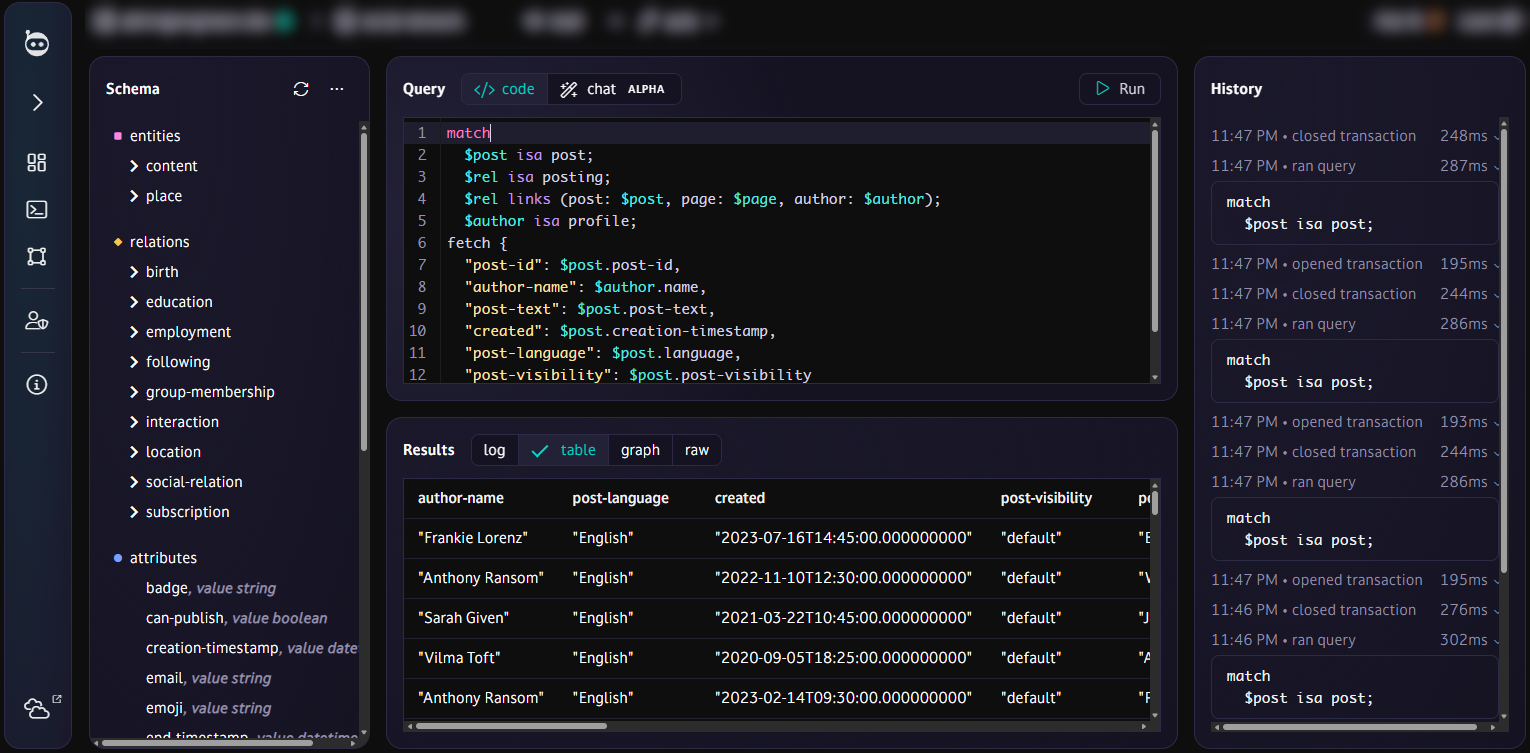
Query tool
Compose and run TypeQL queries in a dev UI with syntax highlighting, autocompletion, and find-and-replace. Run multi-query scripts, save queries for later, and revisit past runs in the query history. Visualise the results as a table, graph, or raw data — and export them as JSON, CSV, or PNG.
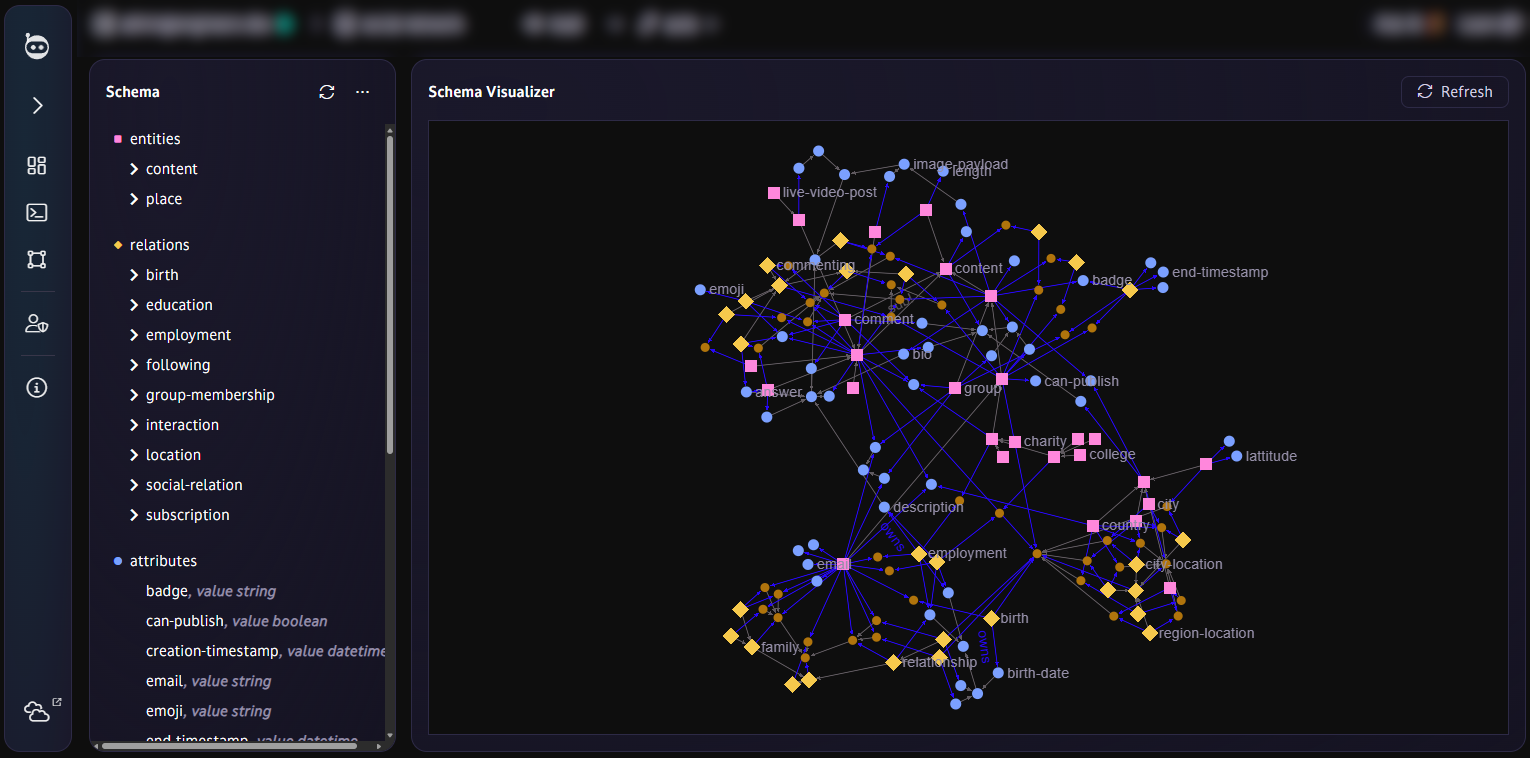
Schema visualizer
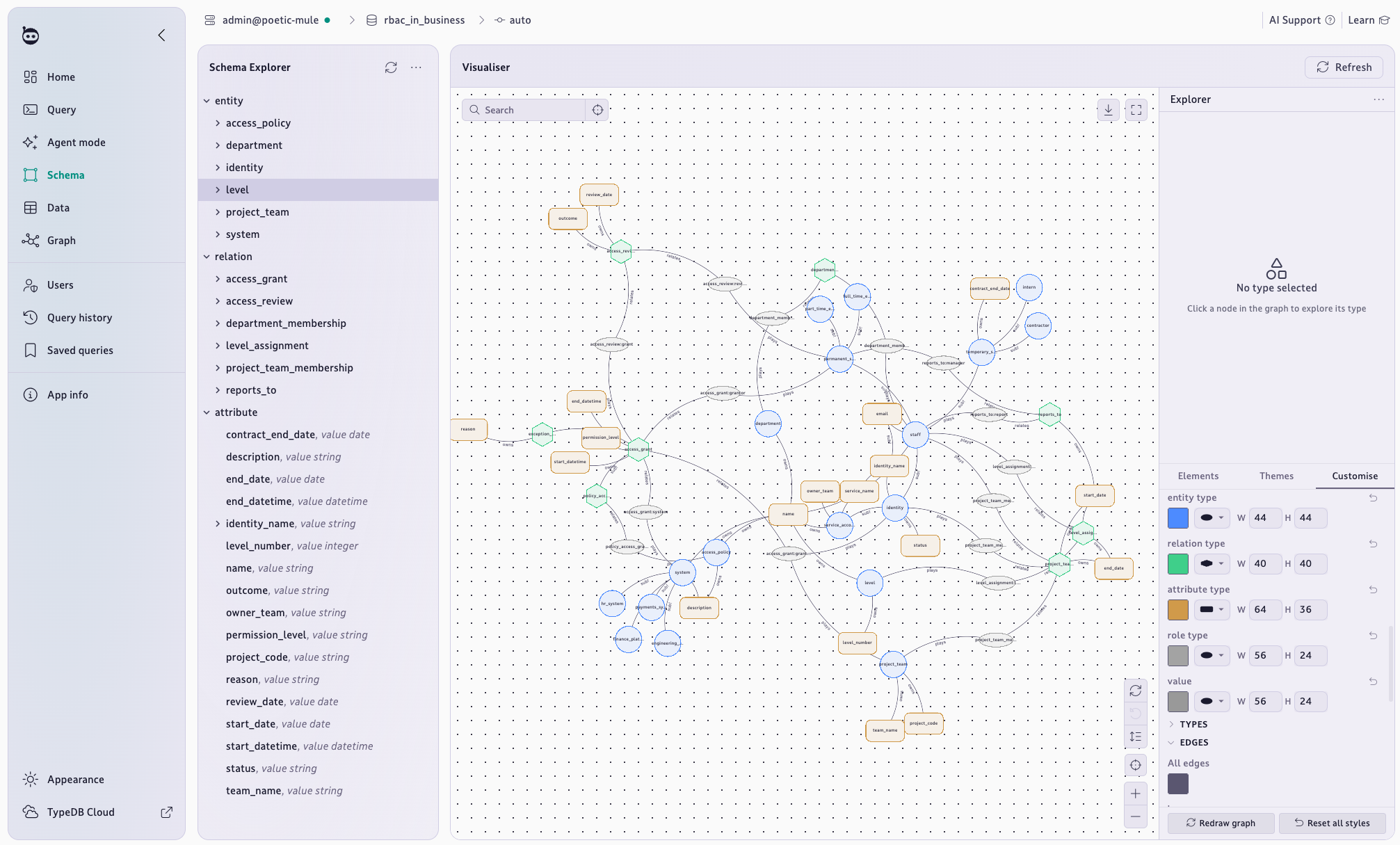
Visualize your entire schema as a graph. Understand the structure of your schema and use it as a reference or a blueprint to iterate on. Make graphs look exactly how you'd like using Studio's powerful fully-customizable graph styling, or explore prebuilt themes.
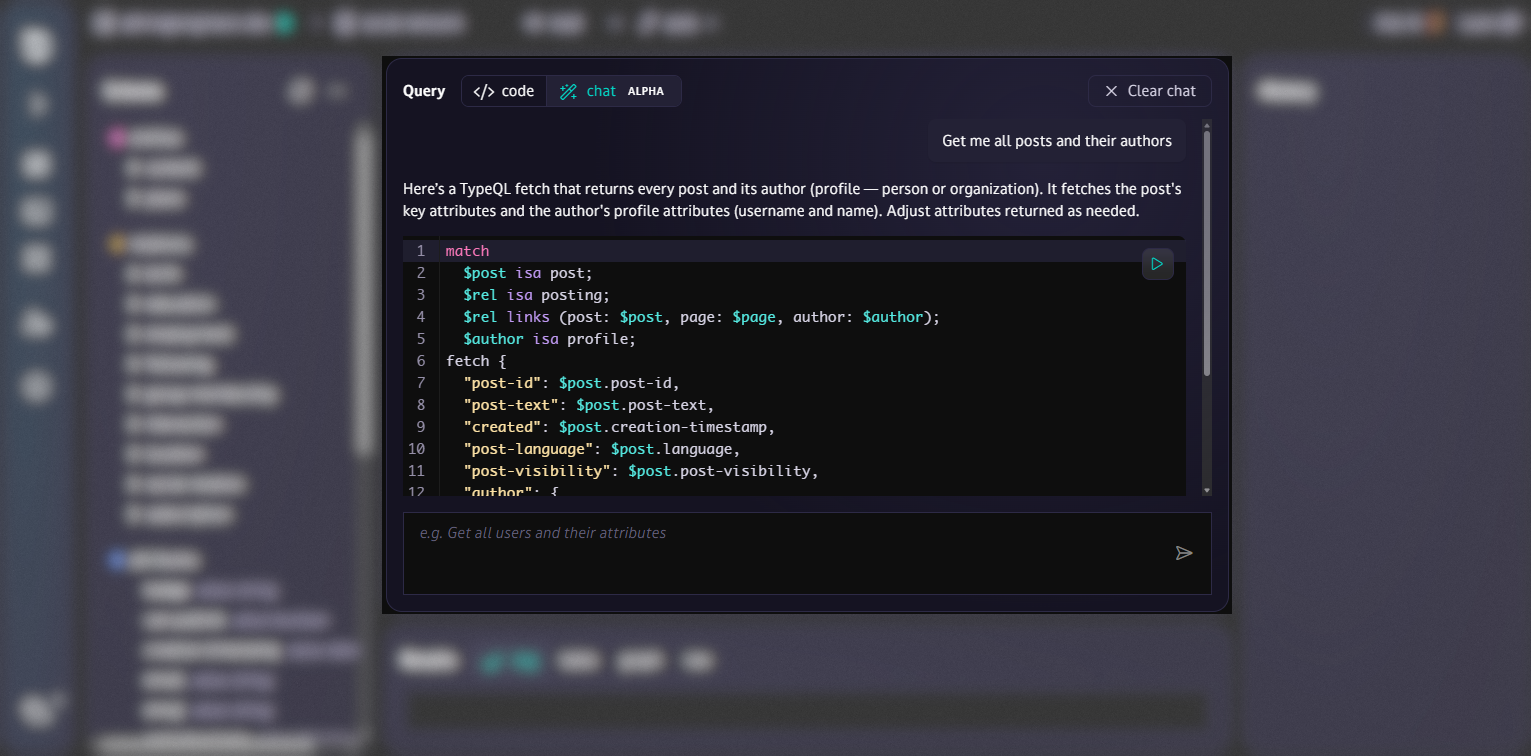
Agent mode
Vibe coding in your database! Ask your queries in natural language, like 'get me all of the user "Bob"'s posts', and let AI draft your query, explain how it works, and offer to run it. You can optionally enable manual transaction control to prevent changes being automatically committed.
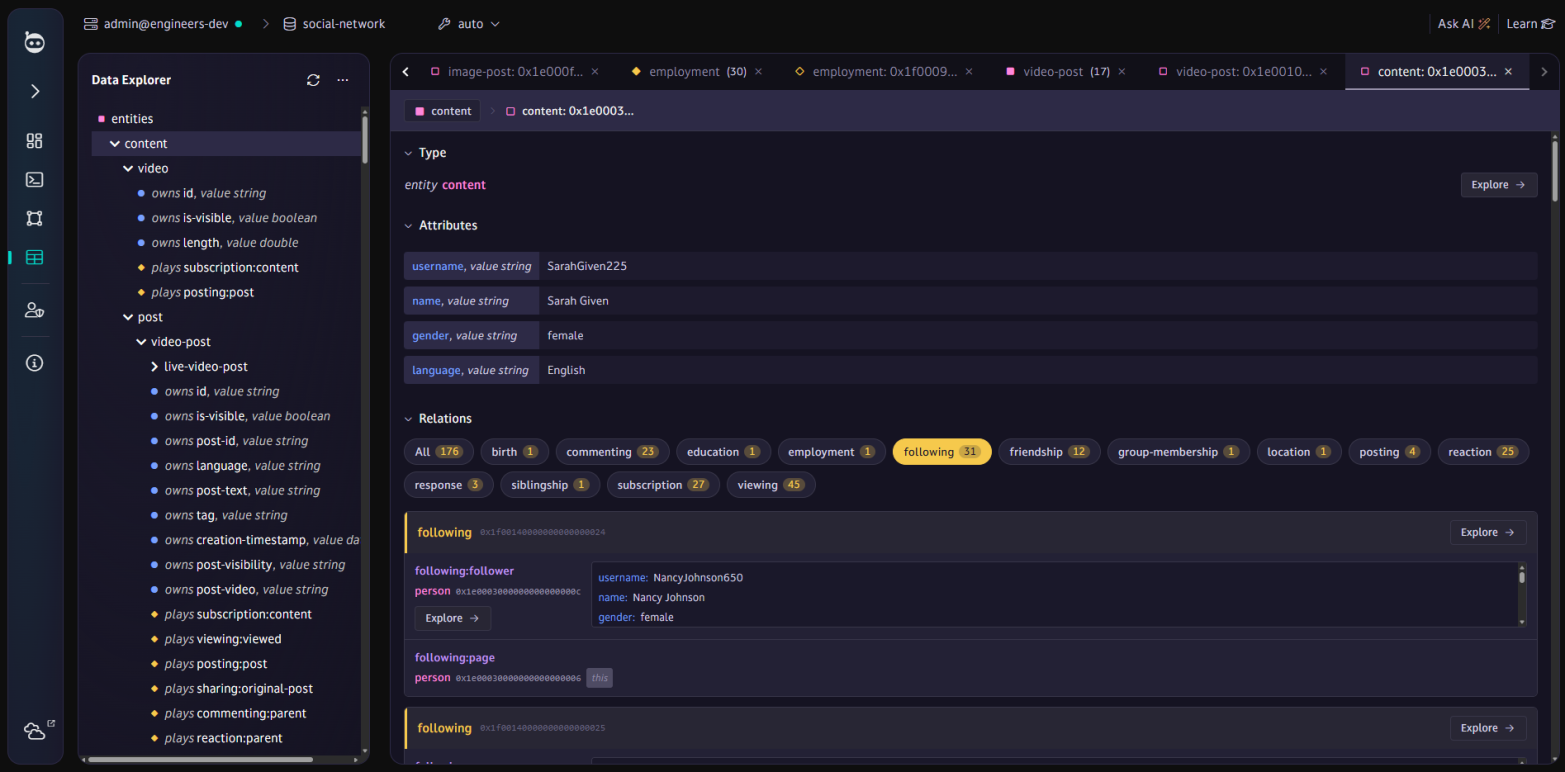
Data explorer
See what data is in your database at a glance with the Data Explorer, a visual view of objects broken down by type, including their attributes and their relationships. Explore individual instances, inspect their properties and click through to their connections.
Graph explorer
Explore your data without writing queries. Starting from any object, right-click to expand its relationships and attributes (per-instance or per-type), growing the graph one hop at a time as you investigate.
Sample datasets
Get started instantly by loading a sample dataset into any database, ready to explore and query.
Compatible with clustered TypeDB
Provide a list of server addresses to gain the full reliability and failover benefits of clustered TypeDB (Cloud or Enterprise).
Management features
When connected as a privileged user, you can create and modify users and databases through the Studio web interface.
Web or desktop
TypeDB Studio is hosted on the web at https://studio.typedb.com, and can also be downloaded as a standalone desktop application for Windows, MacOS or Linux.
Drivers and APIs
TypeDB drivers are client libraries that enable applications to communicate with TypeDB servers. They provide a programming language-specific interface for all server operations, from connection management to query execution.
Python
A Python driver SDK for programmatic querying and other TypeDB operations using gRPC.

TypeScript
A TypeScript driver SDK for programmatic querying and other TypeDB operations using the TypeDB HTTP API.

Java
A Java/Kotlin driver SDK for programmatic querying and other TypeDB operations using gRPC.

Rust
A Rust driver SDK for programmatic querying and other TypeDB operations using gRPC.

C#
A C# driver SDK for programmatic querying and other TypeDB operations using gRPC.
C++
A C++ driver SDK for programmatic querying and other TypeDB operations using gRPC.

C
A C language driver SDK for programmatic querying and other TypeDB operations using gRPC.

HTTP
For languages not listed above, you can use the portable HTTP API.

FFI support
Easily build new native language drivers by interfacing with the FFI layer of the TypeDB Rust driver.
HTTP API
For simple applications where performance is not critical, the HTTP API provides a highly portable way to communicate with a TypeDB server.
Architecture
Applications using TypeDB drivers tend to follow a similar pattern - illustrated here. Architecturally, communication with TypeDB is fully async, preventing any bottlenecks due to query processing. TypeDB returns query results in a stream as they are discovered. Answer streaming is reactive, allowing the server to optimize for the rate of consumption and network latency.
- 1
- 2
- 3
- 4
- 5
- 6
- 7
- 8
- 9
- 10
- 11
- 12
- 13
- 14
- 15
- 16
- 17
- 18
- 19
- 20
- 21
- 22
- 23
- 24
- 25
- 26
- 27
- 28
- 29
- 30
from typedb.driver import *

DB_NAME = "my_database"
address = "localhost:1729"
credentials = Credentials("admin", "password")
options = DriverOptions(is_tls_enabled=False, tls_root_ca_path=None)

# 1. Connect to TypeDB
with TypeDB.driver(address, credentials, options) as driver:
    # 2. Initialize database with a schema  during application startup
    try:
        driver.databases.create(DB_NAME) # raises already exists exception
    finally:
        with driver.transaction(DB_NAME, TransactionType.SCHEMA) as tx:
            tx.query("define entity person;").resolve()
            tx.commit()

    # 3. Open a transaction
    with driver.transaction(DB_NAME, TransactionType.READ) as tx:
        # 4. Execute queries
        result = tx.query("match $x label person; fetch  { 'entity': $x };").resolve()

        # 5. Process results
        for answer in result.as_concept_documents():
            print(answer)

        # 6. Transaction automatically closed, call .commit() to commit and close, or .close() explicitly if not using 'with'

    # 7. Driver connection automatically closed, or call .close() explicitly if not using 'with'
AI features
TypeDB is built to work with your existing AI tech stack. Write queries using our AI agent directly in TypeDB Studio. Connect your agent to a TypeDB application using its MCP server. Supply our LLM-specific context examples to your own LLM to get accurate AI responses to TypeDB prompts.
Studio Agent
Query TypeDB with our AI agent in Agent Mode. Ask it any question and it'll work with you to generate the corresponding TypeQL queries against your specific schema.
MCP server
AI agents can use the TypeDB MCP server to perform queries and other database operations autonomously.
Ask TypeDB AI
TypeDB Docs, Cloud and Studio all have the "Ask TypeDB AI" assistant built-in. Powered by Intercom, this AI assistant is trained on the TypeDB website and docs and offers basic, immediate AI support.
llms.txt
We maintain https://typedb.com/docs/llms.txt and https://typedb.com/docs/llms-full.txt to aid LLMs in understanding TypeDB and TypeQL.
Vector storage and retrieval
Store embedding vectors as attribute values, directly alongside the data they describe, and retrieve them in your queries.
Vector indexing and search
Index stored vectors for fast approximate nearest-neighbor search, and find the records most similar to a given embedding using TypeQL queries.
Developer tools
TypeDB comes with the basic developer tools you'd expect for ease of use - a command-line tool, TypeDB Console, and IDE tooling for the most popular IDEs (VSCode, JetBrains).
Console CLI
TypeDB Console is a command-line tool that allows you to conveniently query and modify data and schema, as well as manage users and databases.
Console interactive mode
Boot into TypeDB Console by providing valid credentials. Explore your data one step at a time using the stateful, interactive REPL (default) mode to open transactions, write queries, commit or rollback.
Console script mode
TypeDB Console also acts as a lightweight tool for TypeDB scripting and automation - just pass it a Console script file as a CLI argument. Scripts can do everything the interactive mode does.
VSCode plugin
The TypeQL plugin for VSCode supports TypeQL syntax highlighting. Planned: The plugin will also support connecting a DB to run queries and other operations.
JetBrains plugin
The TypeQL plugin for JetBrains-based IDEs supports TypeQL syntax highlighting. Planned: The plugin will also support connecting a DB to run queries and other operations.
Get started today
Deploy in the cloud and start building now, or explore more about TypeDB and how its unique capabilities as a polymorphic database can refine and empower your applications.
Start building
A polymorphic database with a conceptual data model, a strong subtyping system, a symbolic reasoning engine, and a type-theoretic language is minutes away.